개발새발 블로그

'JavaSpring'에 해당되는 글 31건

  1. [JavaSpring] servlet post방식
  2. [JavaSpring] servlet get방식
  3. [JavaSpring] servlet
  4. [JavaSpring] config
  5. [JavaSpring] pageContext 2
  6. [JavaSpring] application
  7. [JavaSpring] session 2
  8. [JavaSpring] out
  9. [JavaSpring] response
  10. [JavaSpring] request_infoMethod

[JavaSpring] servlet post방식

컴퓨터/JSP


import jakarta.servlet.ServletException;
import jakarta.servlet.annotation.WebServlet;
import jakarta.servlet.http.HttpServlet;
import jakarta.servlet.http.HttpServletRequest;
import jakarta.servlet.http.HttpServletResponse;
import java.io.IOException;
import java.io.PrintWriter;

public class PostServlet4 extends HttpServlet {
	private static final long serialVersionUID = 1L;

	protected void doPost(HttpServletRequest request, HttpServletResponse response) throws ServletException, IOException {
		String id = request.getParameter("id");
		String pw = request.getParameter("pw");
		String email = request.getParameter("email");
		
		response.setContentType("text/html; charset=utf-8");
		PrintWriter out = response.getWriter();
		out.print("<html>");
		out.print("<body>");
		out.print("<h1>Post Servlet 방식</h1>");
		out.print("<h3>id : " + id + "</h3>");
		out.print("<h3>pw : " + pw + "</h3>");
		out.print("<h3>email : " + email + "</h3>");
		out.print("</body>");
		out.print("</html>");
	}

}


jsp 파일

<%@ page language="java" contentType="text/html; charset=UTF-8"
    pageEncoding="UTF-8"%>
<!DOCTYPE html>
<html>
<head>
<meta charset="UTF-8">
<title>Insert title here</title>
</head>
<body>
	<h1>Post Servlet 방식</h1>
	<form action="PostServlet" method="post">
		ID : <input name="id"><p/>
		PW : <input type="password" name="pw"><p/>
		EMAIL : <input name="email"><p/>
		<input type="submit" value="회원가입">
	</form>
</body>
</html>

'컴퓨터 > JSP' 카테고리의 다른 글

[JavaSpring] 자바 빈으로 회원가입 페이지 만들기  (0) 2024.07.17
[JavaSpring] servlet 로그인 로그아웃  (0) 2024.07.17
[JavaSpring] servlet get방식  (0) 2024.07.17
[JavaSpring] servlet  (0) 2024.07.17
[JavaSpring] config  (0) 2024.07.16

[JavaSpring] servlet get방식

컴퓨터/JSP

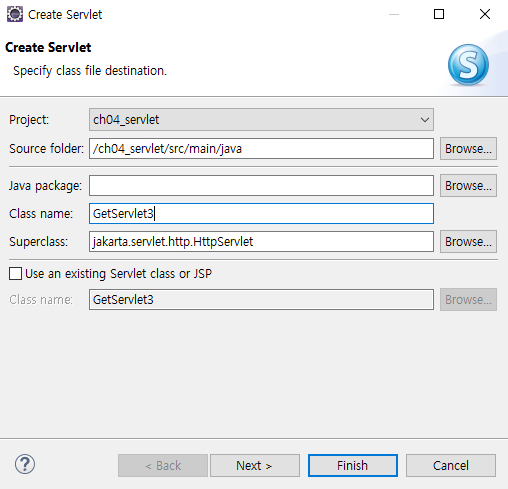
get방식 서블릿 만들기


import jakarta.servlet.ServletException;
import jakarta.servlet.annotation.WebServlet;
import jakarta.servlet.http.HttpServlet;
import jakarta.servlet.http.HttpServletRequest;
import jakarta.servlet.http.HttpServletResponse;
import java.io.IOException;
import java.io.PrintWriter;

public class GetServlet3 extends HttpServlet {
	private static final long serialVersionUID = 1L;

	protected void doGet(HttpServletRequest request, HttpServletResponse response) throws ServletException, IOException {
		String msg = request.getParameter("msg");
		
		response.setContentType("text/html; charset=utf-8");
		PrintWriter out = response.getWriter();
		out.print("<html>");
		out.print("<body>");
		out.print("<h1>Get Servlet 방식</h1>");
		out.print("<h3>msg : " + msg + "</h3>");
		out.print("</body>");
		out.print("</html>");
	}
}


jsp 파일

<%@ page language="java" contentType="text/html; charset=UTF-8"
    pageEncoding="UTF-8"%>
<!DOCTYPE html>
<html>
<head>
<meta charset="UTF-8">
<title>Insert title here</title>
</head>
<body>
	<h1>Get Servlet방식</h1>
	<form action="GetServlet" method="get">
		msg : <input name="msg"><p/>
		<input type="submit">
	</form>
</body>
</html>


'컴퓨터 > JSP' 카테고리의 다른 글

[JavaSpring] servlet 로그인 로그아웃  (0) 2024.07.17
[JavaSpring] servlet post방식  (0) 2024.07.17
[JavaSpring] servlet  (0) 2024.07.17
[JavaSpring] config  (0) 2024.07.16
[JavaSpring] pageContext  (2) 2024.07.16

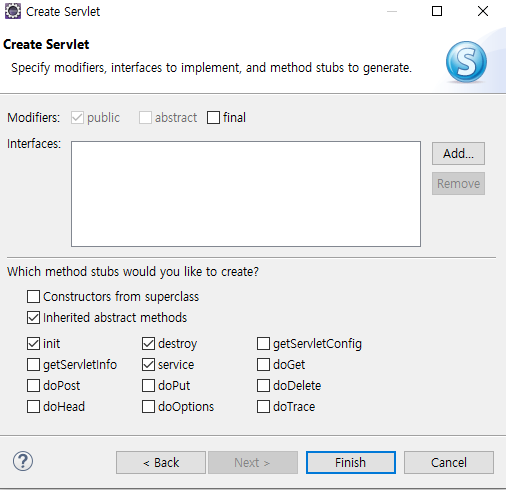
[JavaSpring] servlet

컴퓨터/JSP

import jakarta.servlet.ServletException;
import jakarta.servlet.annotation.WebServlet;
import jakarta.servlet.http.HttpServlet;
import jakarta.servlet.http.HttpServletRequest;
import jakarta.servlet.http.HttpServletResponse;
import java.io.IOException;
import java.io.PrintWriter;

public class ServletTest1 extends HttpServlet {
	private static final long serialVersionUID = 1L;
	protected void service(HttpServletRequest request, HttpServletResponse response) throws ServletException, IOException {
		response.setContentType("text/html; charset=utf-8");
		PrintWriter out = response.getWriter();
		out.print("<html>");
		out.print("<body>");
		out.print("<h1>서블릿을 html문서 만들기</h1>");
		out.print("</body>");
		out.print("</html>");
	}

}


import jakarta.servlet.ServletConfig;
import jakarta.servlet.ServletException;
import jakarta.servlet.annotation.WebServlet;
import jakarta.servlet.http.HttpServlet;
import jakarta.servlet.http.HttpServletRequest;
import jakarta.servlet.http.HttpServletResponse;
import java.io.IOException;

public class ServletTest2 extends HttpServlet {
	private static final long serialVersionUID = 1L;

	public void init(ServletConfig config) throws ServletException {
		System.out.println("init() 호출");
	}

	public void destroy() {
		System.out.println("destroy() 호출");
	}

	protected void service(HttpServletRequest request, HttpServletResponse response) throws ServletException, IOException {
		System.out.println("service() 호출");
		System.out.println("문자변경");
	}
}

'컴퓨터 > JSP' 카테고리의 다른 글

[JavaSpring] servlet post방식  (0) 2024.07.17
[JavaSpring] servlet get방식  (0) 2024.07.17
[JavaSpring] config  (0) 2024.07.16
[JavaSpring] pageContext  (2) 2024.07.16
[JavaSpring] application  (0) 2024.07.16

[JavaSpring] config

컴퓨터/JSP
<%@ page language="java" contentType="text/html; charset=UTF-8"
    pageEncoding="UTF-8"%>
<%@ page import="java.util.*" %>
<!DOCTYPE html>
<html>
<head>
<meta charset="UTF-8">
<title>Insert title here</title>
</head>
<body>
	<h1>config 정보</h1>
	<table border="1">
		<tr>
			<th>초기 파라미터 이름</th>
			<th>초기 파라미터 값</th>
		</tr>
	<%
		Enumeration e = config.getInitParameterNames();
		while(e.hasMoreElements()) {
			String initParamName = (String)e.nextElement();
	%>
		<tr>
			<td><%=initParamName %></td>
			<td><%=config.getInitParameter(initParamName) %>
		</tr>
	<%
		}
	%>
	</table>
</body>
</html>

'컴퓨터 > JSP' 카테고리의 다른 글

[JavaSpring] servlet get방식  (0) 2024.07.17
[JavaSpring] servlet  (0) 2024.07.17
[JavaSpring] pageContext  (2) 2024.07.16
[JavaSpring] application  (0) 2024.07.16
[JavaSpring] session  (2) 2024.07.16

[JavaSpring] pageContext

컴퓨터/JSP
<%@ page language="java" contentType="text/html; charset=UTF-8"
    pageEncoding="UTF-8"%>
<!DOCTYPE html>
<html>
<head>
<meta charset="UTF-8">
<title>Insert title here</title>
</head>
<body>
	<%
		out.print("out.print()메소드를 이용한 출력<p/>");
	
		pageContext.getOut().print("pageContext.getOut()을 이용한 출력");
	%>
</body>
</html>


'컴퓨터 > JSP' 카테고리의 다른 글

[JavaSpring] servlet  (0) 2024.07.17
[JavaSpring] config  (0) 2024.07.16
[JavaSpring] application  (0) 2024.07.16
[JavaSpring] session  (2) 2024.07.16
[JavaSpring] out  (0) 2024.07.16

[JavaSpring] application

컴퓨터/JSP
<%@ page language="java" contentType="text/html; charset=UTF-8"
    pageEncoding="UTF-8"%>
<!DOCTYPE html>
<html>
<head>
<meta charset="UTF-8">
<title>Insert title here</title>
</head>
<body>
	<h1>Application</h1>
	서블릿 컨테이너의 이름과 버전 : <%=application.getServerInfo() %><p/>
	01.1.request.html파일의 MIME type : 
				<%=application.getMimeType("01.1.request.html") %><p/>
	웹 어플리케이션의 url 경로명 : <%=application.getContextPath() %><p/>
	로컬에 저장되어 있는 경로명 : <%=application.getRealPath("/") %>
	<% application.log("application 로그 확인"); %>
</body>
</html>

'컴퓨터 > JSP' 카테고리의 다른 글

[JavaSpring] config  (0) 2024.07.16
[JavaSpring] pageContext  (2) 2024.07.16
[JavaSpring] session  (2) 2024.07.16
[JavaSpring] out  (0) 2024.07.16
[JavaSpring] request_infoMethod  (0) 2024.07.16

[JavaSpring] session

컴퓨터/JSP
<!DOCTYPE html>
<html>
<head>
<meta charset="UTF-8">
<title>Insert title here</title>
</head>
<body>
	<h1>session</h1>
	<form action="05.2.session.jsp">
		ID : <input name="id"><p/>
		PW : <input type="password" name="pwd"><p/>
		<input type="submit">
		<input type="reset">
	</form>
</body>
</html>
<%@ page language="java" contentType="text/html; charset=UTF-8"
    pageEncoding="UTF-8"%>
<!DOCTYPE html>
<html>
<head>
<meta charset="UTF-8">
<title>Insert title here</title>
</head>
<body>
	<%
		String id = request.getParameter("id");
		String pw = request.getParameter("pwd");
		
		session.setAttribute("idKey", id);
		session.setMaxInactiveInterval(60);
	%>
	<h1>Session Ex</h1>
	<form method="post" action="05.3.session.jsp">
		1. 가장 좋아하는 계절은?<p/>
		<input type="radio" name="season" value="봄">봄&emsp;
		<input type="radio" name="season" value="여름">여름&emsp;
		<input type="radio" name="season" value="가을">가을&emsp;
		<input type="radio" name="season" value="겨울">겨울<p/>
		
		2. 가장 좋아하는 과일은?<p/>
		<input type="radio" name="fruit" value="사과">사과&emsp;
		<input type="radio" name="fruit" value="포도">포도&emsp;
		<input type="radio" name="fruit" value="딸기">딸기&emsp;
		<input type="radio" name="fruit" value="자두">자두<p/>
		
		<input type="submit">
	</form>
</body>
</html>
<%@ page language="java" contentType="text/html; charset=UTF-8"
    pageEncoding="UTF-8"%>
<!DOCTYPE html>
<html>
<head>
<meta charset="UTF-8">
<title>Insert title here</title>
<%
	String season = request.getParameter("season");
	String fruit = request.getParameter("fruit");
	
	String id = (String)session.getAttribute("idKey");
	String sessionId = session.getId();
	int intervalTime = session.getMaxInactiveInterval();
%>
</head>
<body>
<%
	if(id != null) {
%>
		<h1>Session Ex1</h1>
		<%=id %>님이 좋아하는 계절과 과일은 <%=season %>과 <%=fruit %>입니다<p/>
		세션 ID : <%=sessionId %><p/>
		세션 유지시간 : <%=intervalTime %>초<p/>
<%
		session.invalidate();
	} else {
		out.print("세션의 시간이 경과하였거나 다른 이유로 연결 할 수 없습니다");
	}
%>
</body>
</html>

'컴퓨터 > JSP' 카테고리의 다른 글

[JavaSpring] pageContext  (2) 2024.07.16
[JavaSpring] application  (0) 2024.07.16
[JavaSpring] out  (0) 2024.07.16
[JavaSpring] request_infoMethod  (0) 2024.07.16
[JavaSpring] request  (0) 2024.07.16

[JavaSpring] out

컴퓨터/JSP
<%@ page language="java" contentType="text/html; charset=UTF-8"
    pageEncoding="UTF-8" buffer="5kb" %>
<!DOCTYPE html>
<html>
<head>
<meta charset="UTF-8">
<title>Insert title here</title>
</head>
<body>
<%
	int totalBuffer = out.getBufferSize();
	int remainBuffer = out.getRemaining();
	int useBuffer = totalBuffer - remainBuffer;
%>
	총 버퍼 크기 : <%=totalBuffer %>byte<p/>
	현재 버퍼 사용량 : <%=useBuffer %>byte<p/>
	남은 버퍼 크기 : <%=remainBuffer %>byte<p/>
</body>
</html>

'컴퓨터 > JSP' 카테고리의 다른 글

[JavaSpring] application  (0) 2024.07.16
[JavaSpring] session  (2) 2024.07.16
[JavaSpring] request_infoMethod  (0) 2024.07.16
[JavaSpring] request  (0) 2024.07.16
[JavaSpring] action_forward 혈액형 연습 문제  (13) 2024.07.16

[JavaSpring] response

컴퓨터/JavaScript
<%@ page language="java" contentType="text/html; charset=UTF-8"
    pageEncoding="UTF-8"%>
<!DOCTYPE html>
<html>
<head>
<meta charset="UTF-8">
<title>Insert title here</title>
</head>
<body>
	<h1>sendRedirect Ex</h1>
	<%
		response.sendRedirect("03.2.response.jsp");
		// response.sendRedirect("https://www.tjoeun.co.kr");
	%>
</body>
</html>
<%@ page language="java" contentType="text/html; charset=UTF-8"
    pageEncoding="UTF-8"%>
<!DOCTYPE html>
<html>
<head>
<meta charset="UTF-8">
<title>Insert title here</title>
</head>
<body>
	<h1>sendRedirect Ex</h1>
	<%
		if(request.getProtocol().equals("HTTP/1.1"))
			response.setHeader("Cache-Control", "no-store");  // HTTP/1.1
		else
			response.setHeader("Pragma", "no-cache"); // HTTP/1.0
	%>
	03.2.response.jsp파일의 본문 입니다
</body>
</html>

'컴퓨터 > JavaScript' 카테고리의 다른 글

[JavaSpring] action_scriptTag  (4) 2024.07.16
[JavaScript] 정규표현식  (0) 2024.07.09
[JavaScript] 이벤트  (0) 2024.07.08
[JavaScript] window용 객체  (0) 2024.07.08
[JavaScript] 분해 할당  (0) 2024.07.08

[JavaSpring] request_infoMethod

컴퓨터/JSP
<%@ page language="java" contentType="text/html; charset=UTF-8"
    pageEncoding="UTF-8"%>
<!DOCTYPE html>
<html>
<head>
<meta charset="UTF-8">
<title>Request Info Method</title>
</head>
<body>
	<h1>Request Info Method</h1>
	프로토콜 : <%=request.getProtocol() %><p/>
	서버의 이름 : <%=request.getServerName() %><p/>
	서버의 포트번호 : <%=request.getServerPort() %><p/>
	클라이언트의 주소 : <%=request.getRemoteAddr() %><p/>
	클라이언트의 이름 : <%=request.getRemoteHost() %><p/>
	사용한 Method : <%=request.getMethod() %><p/>
	요청 경로(URI) : <%=request.getRequestURI() %><p/>
	요청 경로(URL) : <%=request.getRequestURL() %><p/>
	현재 사용하는 브라우저 : <%=request.getHeader("User-Agent") %><p/>
	파일 type : <%=request.getHeader("Accept") %>
</body>
</html>

'컴퓨터 > JSP' 카테고리의 다른 글

[JavaSpring] session  (2) 2024.07.16
[JavaSpring] out  (0) 2024.07.16
[JavaSpring] request  (0) 2024.07.16
[JavaSpring] action_forward 혈액형 연습 문제  (13) 2024.07.16
[JavaSpring] action_forward  (2) 2024.07.16