[CSS] 고정, 가변 layout
컴퓨터/CSS<HTML>
<!DOCTYPE html>
<html lang="en">
<head>
    <meta charset="UTF-8">
    <meta name="viewport" content="width=device-width, initial-scale=1.0">
    <!-- <link href="resources/css/17.1.style.css" rel="stylesheet"> -->
    <link href="resources/css/17.2.style.css" rel="stylesheet">
    <title>고정및 가변 layout</title>
</head>
<body>
   <div id="wrapper">
        <header>
            <h1 class="header-text">고정 그리드 레이아웃</h1>
        </header>
        <section class="content">
            <h4>본문 Lorem ipsum dolor sit amet consectetur adipisicing elit. Assumenda blanditiis est amet consequatur iste ut dicta consectetur! Doloremque odit itaque numquam dolores animi sequi a, porro iste tempore saepe minima?
            Officia modi ipsam veritatis sequi consequatur voluptates accusantium quos quaerat ut tenetur maiores suscipit illum nemo dolorum in eaque hic aliquid iusto, nihil ea voluptatem! Est reprehenderit dolorum nisi nostrum?</h4>
        </section>
        <aside class="right-side">
            <h4>사이드바</h4>
        </aside>
        <footer>
            <h4>푸터</h4>
        </footer>
   </div>
</body>
</html>
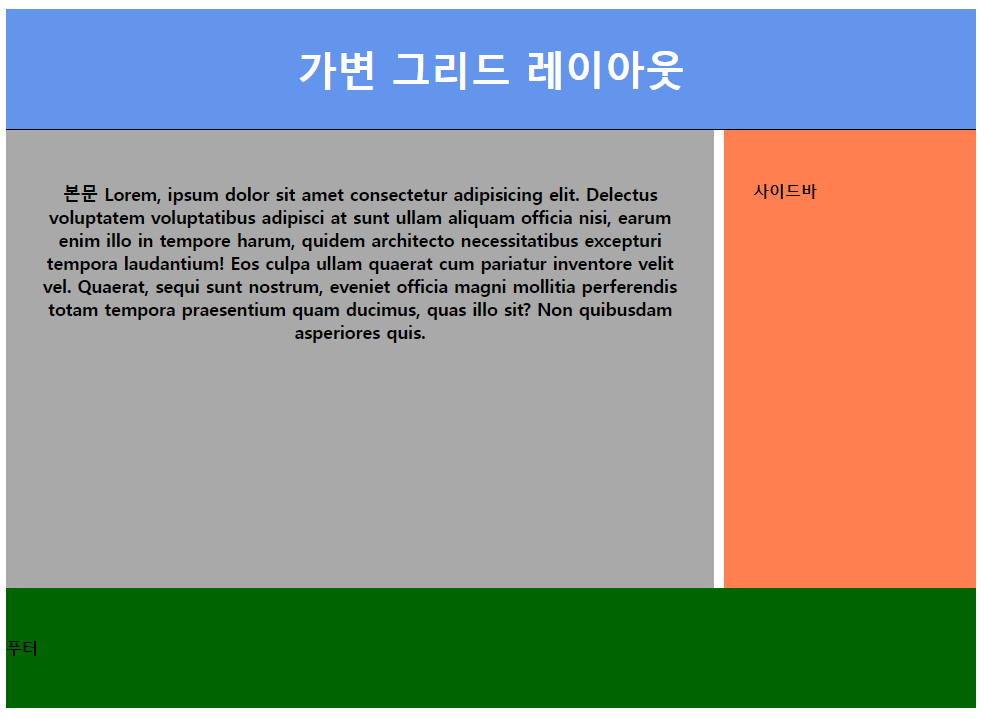
<CSS1>
#wrapper {
    width: 950px;
    margin: 0 auto;
}
/* 헤더 */
header {
    width: 950px;
    height: 120px;
    background-color: rgb(51, 77, 78);
    border-bottom: 1px solid;
}
.header-text {
    font-size: 40px;
    color: white;
    text-align: center;
    line-height: 120px;
}
#variable {
    display: none;
}
/* 본문 */
.content {
    float: left;
    width: 700px;
    height: 400px;
    background-color: beige;
}
/* aside */
.right-side {
    float: right;
    width: 240px;
    height: 400px;
    background-color: chocolate;
}
/* footer */
footer {
    clear: both;
    height: 120px;
    background-color: aquamarine;
}
<CSS2>
#wrapper{
    width: 100%;
}
/* 헤더 */
header {
    width: 100%;
    height: 120px;
    background-color: cornflowerblue;
    border-bottom: 1px solid;
}
#fixed {
    display: none;
}
.header-text {
    font-size: 40px;
    color: white;
    text-align: center;
    line-height: 120px;
}
/* 본문 */
.content {
    float: left;
    width: 67%;
    height: 400px;
    padding: 3%;
    background-color: rgb(235, 235, 235);
    text-align: center;
    font-size: 1.1em;
}
/* aside */
.right-side {
    float: right;
    width: 20%;
    height: 400px;
    padding: 3%;
    background-color: rgb(255, 170, 139);
}
/* footer */
footer {
    clear: both;
    width: 100%;
    height: 120px;
    background-color: rgb(104, 164, 104);
    line-height: 120px;
}
'컴퓨터 > CSS' 카테고리의 다른 글
| [CSS] 반응형 웹 (0) | 2024.07.02 |
|---|---|
| [CSS] flex (0) | 2024.07.02 |
| [CSS] semantic 태그 (0) | 2024.06.30 |
| [CSS] 배치 관련 스타일 (0) | 2024.06.30 |
| [CSS] 요소 배치 스타일 (0) | 2024.06.30 |